Integration Designer
Generate a ready-to-use code snippet to add the reservation widget to any website.
Configuration
Used throughout the reservation form.
Optional color for the floating Reserve button. Defaults to the accent color.
Website preview
Enter your website URL to see the floating widget injected into a safe preview copy.
Preview
Embed code
Paste this snippet before the closing body tag of your website. A floating reservation button will appear in the bottom-right corner.
<reservier-widget
  business-id="demo"
  locale="de"
  primary-color="#4f46e5"
></reservier-widget>
<script src="https://reservier.at/widget/v1/widget.js"></script>
Widget attributes
These attributes configure the widget and script embeds. On the script-only snippet, prefix each name with data-.
| Attribute | Type | Description |
|---|---|---|
| business-id | string | Your public business identifier. Required. |
| locale | string | Initial language: de, en, fr, it, or ru. |
| primary-color | string | Accent color used throughout the reservation form. |
| button-color | string | Color of the floating Reserve button. If omitted, the button uses primary-color. |
button-color applies to the widget and script embeds only — the iframe has no floating button.
Reservier JavaScript API
window.ReservierThe widget script installs a global Reservier object. Use it to open or close the reservation panel from your own buttons, menus, or application code.
Methods
| Method | Call | Description |
|---|---|---|
| open(options?) | Reservier.open({ locale }) | Opens the reservation panel. You can pass an options object with locale to set the language. Safe to call when the panel is already open. |
| close() | Reservier.close() | Closes the reservation panel. |
| openCoupons(options?) | Reservier.openCoupons({ locale }) | Opens the gift-voucher panel if coupon sales are enabled. Accepts the same options as open(). |
Options
| Option | Type | Description |
|---|---|---|
| locale | string | Optional UI language: de, en, fr, it, or ru. If omitted, the widget keeps its current language. Unknown values fall back to an enabled language. |
All methods return void.
HTML attribute
No JavaScript required: any element with open-widget="reservier.at" or open-widget="reservier.net" opens the panel.
<button type="button" open-widget="reservier.at">
  Reserve now
</button>
Custom element
If you used the <reservier-widget> tag, the same methods are also available on the element after it upgrades.
const widget = document.querySelector('reservier-widget');
widget?.open({ locale: 'de' });
widget?.close();
widget?.openCoupons();
Example
<button type="button" id="book-table">
  Reserve now
</button>
<script>
  document.getElementById('book-table').addEventListener('click', function () {
    window.Reservier.open({ locale: 'de' });
  });
</script>
TypeScript
interface ReservierOpenOptions {
  locale?: string;
}

interface ReservierApi {
  open: (options?: ReservierOpenOptions) => void;
  close: () => void;
  openCoupons: (options?: ReservierOpenOptions) => void;
}

declare global {
  interface Window {
    Reservier: ReservierApi;
  }
}
Notes
- Calls made before the widget mounts are queued and run as soon as it is ready.
- This API is available with the widget or script-only embed — not with the iframe.
- Prefer calling methods from a user action such as a click. Immediate calls on page load only work after widget.js has executed.
- locale is optional. The widget only switches to languages enabled for that business.
Google Business Profile

Add your booking page to Google Search so guests can reserve directly from your profile.
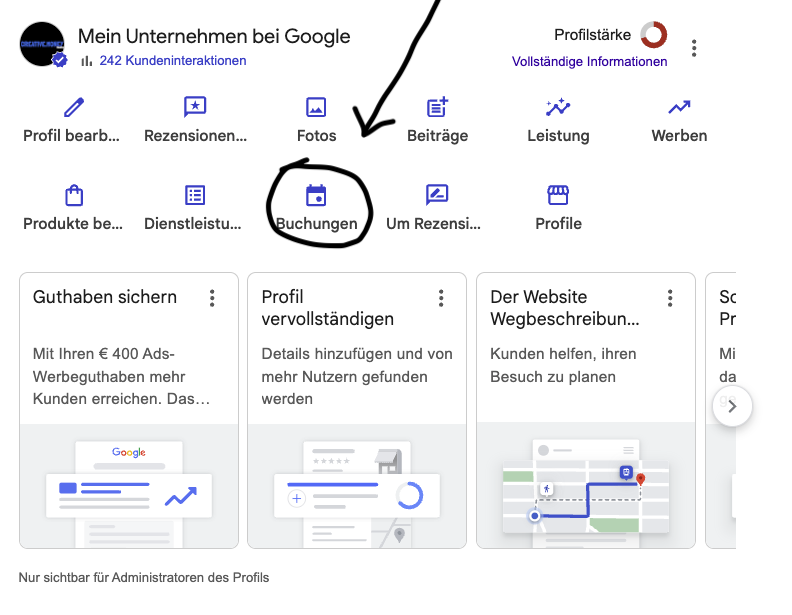
Your booking link
This is the same URL as the iframe. Paste it into the Bookings field on Google.
https://reservier.at/de/demo- 1Copy the booking link above.
- 2Open Google Search for your business. Sign in as a profile owner to see the owner toolbar.
- 3Click Bookings (German: Buchungen), paste the link, and save.
Only visible to profile administrators.
We use essential cookies for the website to function properly. With your consent, we also use analytics cookies to improve your experience. Privacy Policy