---
title: "Reservation add-ons: wine pairing, champagne and more | RESERVIER.AT"
description: "Sell wine pairings, champagne on arrival or flowers on the table directly with the reservation. Paid online or at the restaurant, limited by season, visible to your team on every booking."
canonical_url: "https://reservier.at/en/product/add-ons"
locale: en
meta:
keywords: "restaurant reservation add-ons, book wine pairing online, restaurant upselling, fine dining reservation system, pre-book champagne on arrival"
"og:description": "Let guests book wine pairing, champagne and flowers on the table together with their reservation. Paid online or at the restaurant, visible to your team on every booking."
"og:title": "Reservation add-ons for fine dining"
---
> Index of every page on this site: [llms.txt](https://reservier.at/llms.txt)
# **The evening begins **with the reservation.
Wine pairing, champagne on arrival, truffle with the main course: your guests book add-ons together with their table. You earn more per evening and know in advance what to prepare.
[**Go to setup**](https://reservier.at/en/product/setup) [**Contact us**](https://reservier.at/en/contact)
reservier.at/admin/latest-reservations
- Payment
- **Online or at the restaurant**
- Availability
- **Seasonally controlled**
- Booking channels
- **Online and by phone**
**The menu before the menu**
## **What guests like to book in advance**
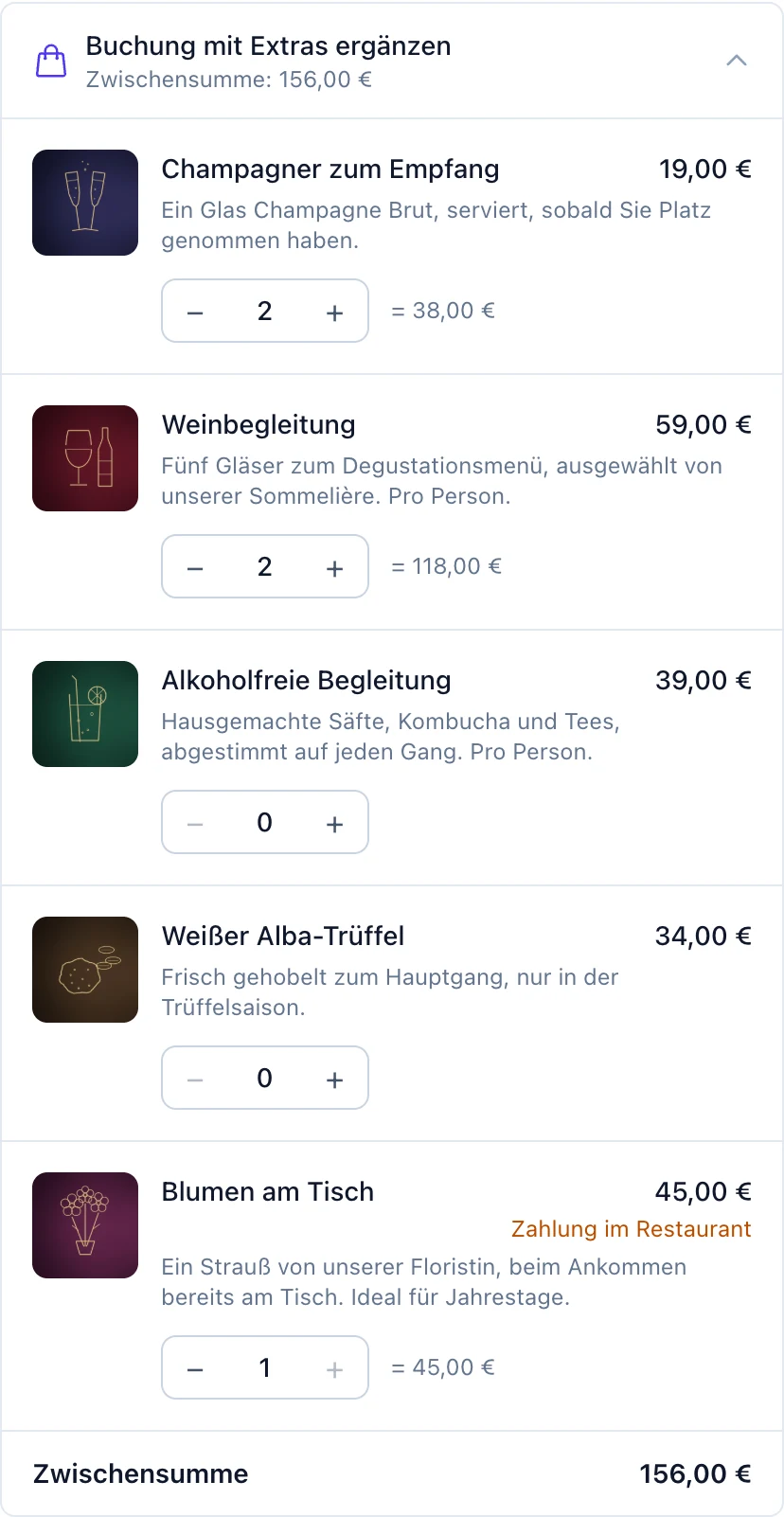
This is what a catalogue for a tasting menu looks like. You set the prices, texts and images yourself.
- ### **Champagne on arrival****€19.00**
Served as soon as guests are seated
- ### **Wine pairing****€59.00**
Five glasses with the menu, per person
- ### **Non-alcoholic pairing****€39.00**
Juices, kombucha and teas with every course
- ### **White Alba truffle****€34.00**
Bookable from October to December only
- ### **Flowers on the table****€45.00**
For anniversaries, paid at the restaurant
Sample prices from our demo restaurant.
**Why add-ons**
## **More revenue, fewer surprises**
### **More per table**
Guests choose the wine pairing at home, at their leisure, rather than under time pressure at the table.
### **Better prepared**
Kitchen, sommelier and service see before the evening how many pairings, truffles or bouquets are needed.
### **Seasons under control**
Truffles, asparagus or New Year's Eve: limit an add-on to a set period. Afterwards it disappears on its own.
**Catalogue**
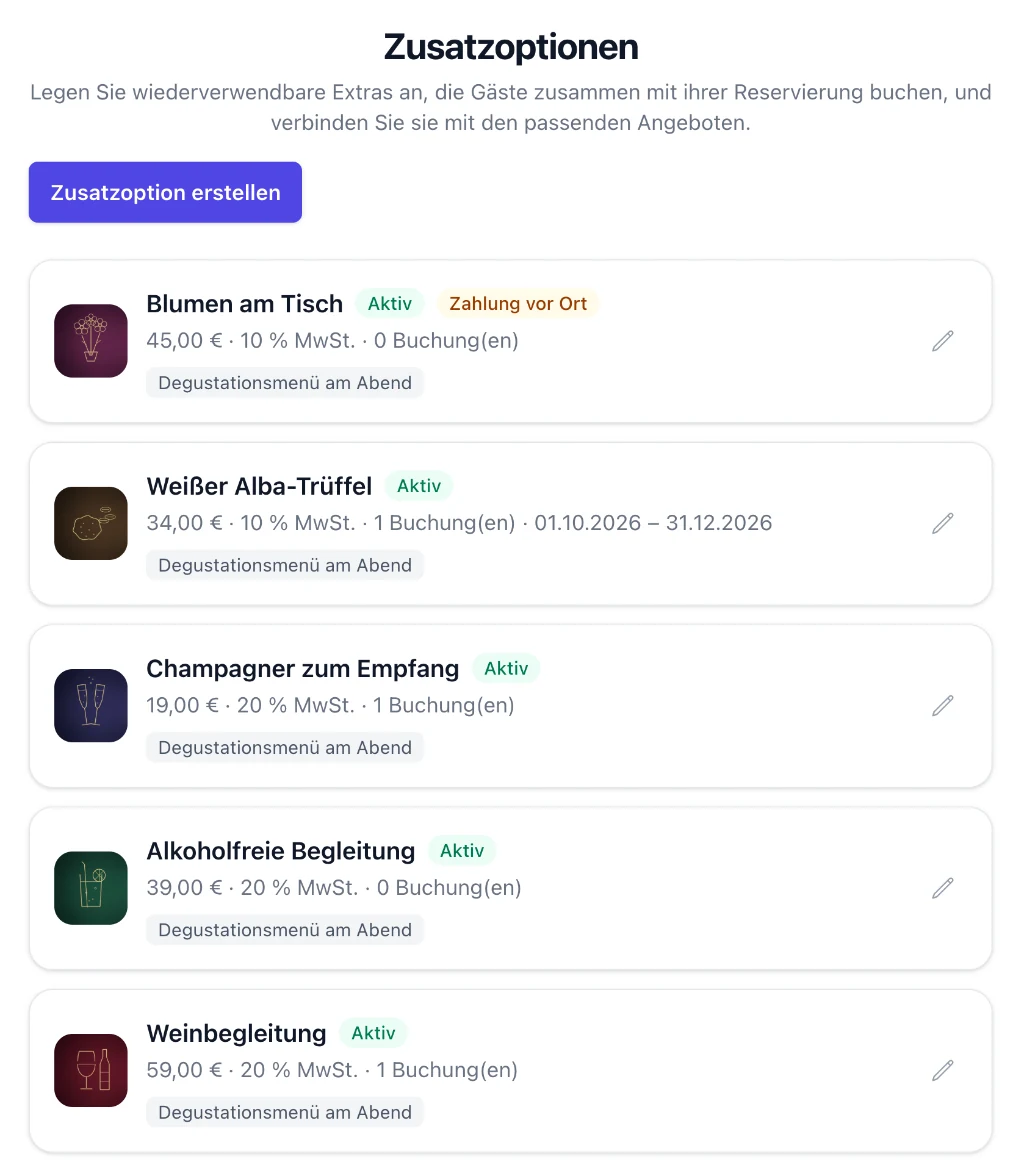
## **All add-ons in one place**
You create each add-on once and use it in as many offers as you like. The list shows price, VAT, availability period and how often it has been booked.
- Image, name and description for guests
- Price and VAT per add-on
- Number of bookings at a glance
- Active or paused, without deleting
**Settings**
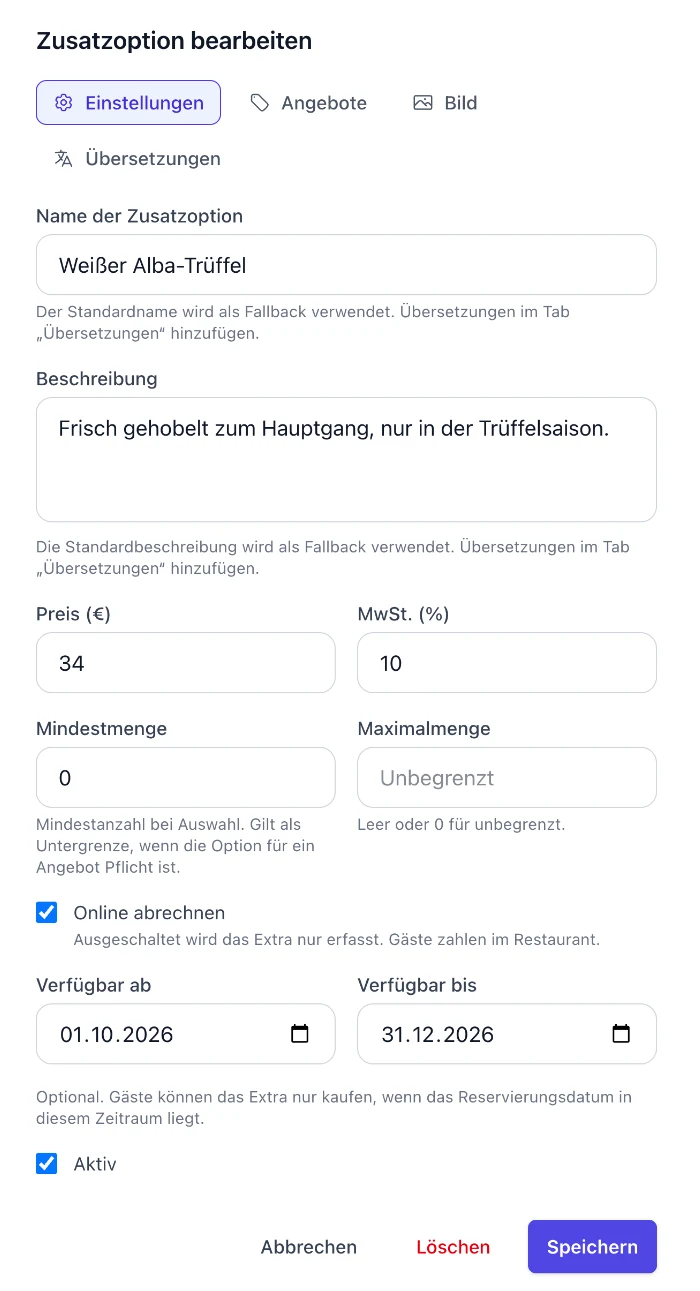
## **Exactly as much as you want to offer**
You set minimum and maximum quantity, availability period and billing for each add-on. Flowers only once per table, truffles only in season.
- Minimum and maximum quantity
- Available from and until, e.g. for truffle season
- Charge online or just note it
- Translations for international guests
**Offers**
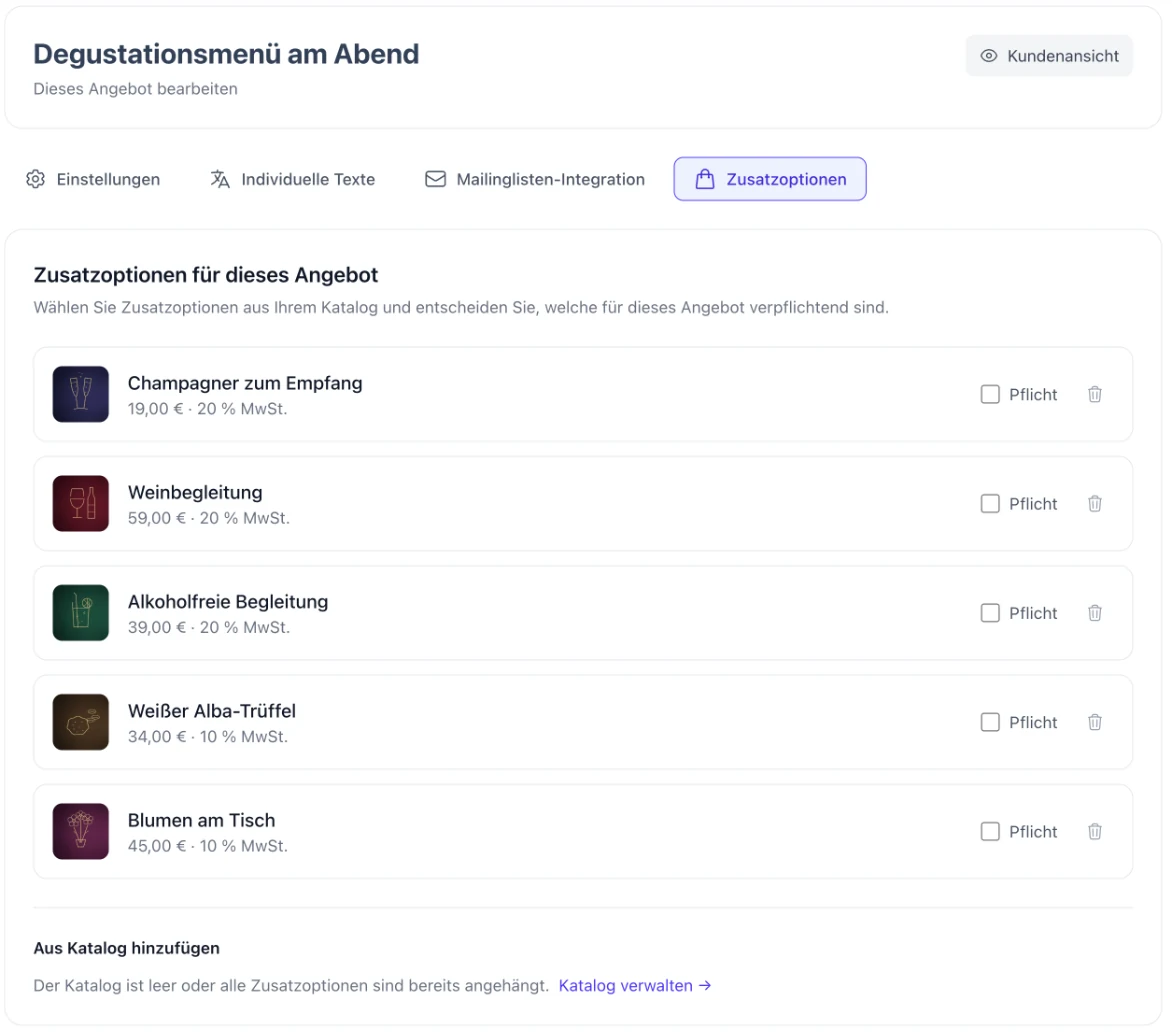
## **The right add-ons for each offer**
Wine pairing with the tasting menu, none of it with the set lunch. You decide for each offer which add-ons guests see.
- Link add-ons from the catalogue
- Without linked add-ons, the offer stays as before
- Mark as mandatory, e.g. a menu
- One add-on in several offers
**For your guests**
## **When booking, not at the table**
Guests see your add-ons with image, description and price, choose the quantity and see the subtotal. The confirmation page lists everything once more.
- Images and descriptions like on a menu
- Subtotal updates as they go
- Add-ons paid at the restaurant are clearly marked
- In the guest's language
**For your team**
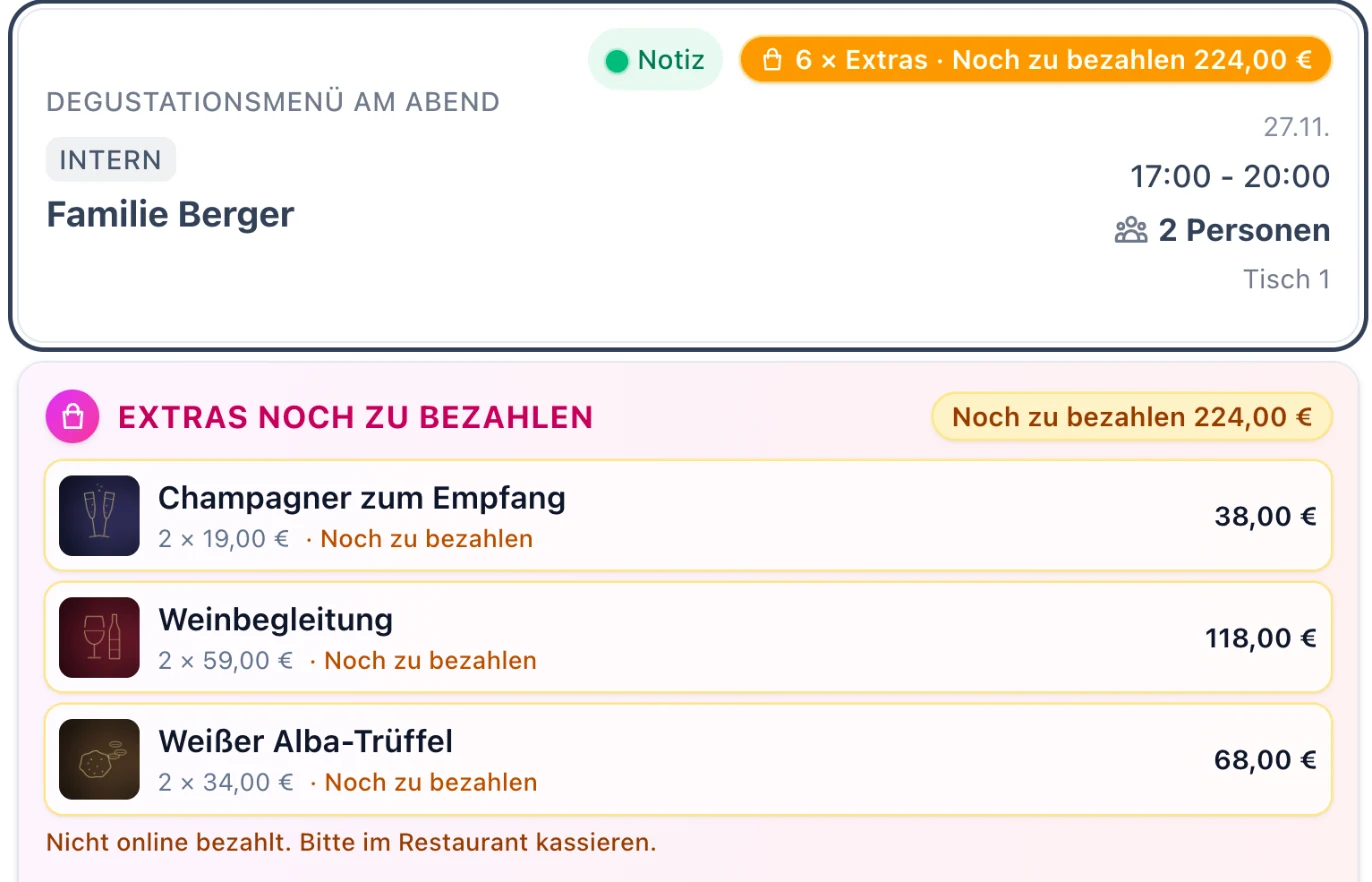
## **Everything on the reservation**
A label shows at once how many add-ons are booked and what is still to be paid. Expanded, it lists every add-on with quantity and price.
- Paid or outstanding, at a glance
- Quantity and price per add-on
- Also in the confirmation email to the guest
- Included in the reservation export

**Payment**
## **You decide when payment happens**
For each add-on you decide whether the guest pays with the booking or at the restaurant.
- **Online with the booking**
The guest pays for the add-ons directly when reserving. This requires payment processing to be set up.
- **At the restaurant**
The add-on is only noted. Guest and team can see that it will be charged during the visit.
- **Booked by phone**
Create a reservation in the admin and book add-ons right along with it. Payment is then made at the restaurant.
## **How it works**
1. **01**### **Create add-ons**
Admin → Add-ons → Create Add-on. Enter name, price, VAT and image.
2. **02**### **Link them to offers**
In the offer, select the matching add-ons under Add-ons.
3. **03**### **Guests book them too**
From now on the add-ons appear when reserving and on every booking in the admin.
## **Questions**
**Does the guest have to pay online? **
No. For each add-on you choose whether it is paid online with the booking or only noted and charged at the restaurant.
**Can I offer an add-on for a limited time only? **
Yes. With “Available from” and “Available until”, an add-on can only be booked if the reservation date falls within that period.
**Can an add-on be mandatory? **
Yes. In the offer you mark an add-on as mandatory. Guests must then choose at least the minimum quantity.
**Are the add-ons translated? **
Yes. You maintain name and description per language. On the first entry we automatically translate into your restaurant's languages.
**Where do I find the feature? **
In the admin under “Add-ons”. If you don't see the menu item yet, just send us a short message. We will activate it for your restaurant.
## **Related**
- [**Offers**](https://reservier.at/en/product/offers)
- [**Deposits**](https://reservier.at/en/product/deposits)
- [**Invoices**](https://reservier.at/en/product/invoices)
- [**Vouchers**](https://reservier.at/en/product/vouchers)
## **Ready for your first champagne on arrival?**
Set up reservier.at or talk to us about your add-ons.
[**Go to setup**](https://reservier.at/en/product/setup) [**Contact us**](https://reservier.at/en/contact)
```json
{"@context":"https://schema.org","@type":"SoftwareApplication","name":"Reservier.at Add-ons","applicationCategory":"BusinessApplication","operatingSystem":"Web Browser","featureList":["Add-on catalogue with image, price and VAT","Payment online with the booking or at the restaurant","Seasonal availability and mandatory add-ons per offer"]}
```
```json
{"@context":"https://schema.org","@graph":[{"@id":"https://reservier.at/en#website","@type":"WebSite","description":"Restaurant Reservation Management System - Online Reservierungssystem für Restaurants","name":"RESERVIER.AT","url":"https://reservier.at/en","translationOfWork":{"@id":"https://reservier.at/de#website"}},{"@id":"https://reservier.at/en/product/add-ons#webpage","@type":"WebPage","description":"Sell wine pairings, champagne on arrival or flowers on the table directly with the reservation. Paid online or at the restaurant, limited by season, visible to your team on every booking.","name":"Reservation add-ons: wine pairing, champagne and more","url":"https://reservier.at/en/product/add-ons","isPartOf":{"@id":"https://reservier.at/en#website"},"potentialAction":[{"@type":"ReadAction","target":["https://reservier.at/en/product/add-ons"]}]}]}
```
## Sitemap
See the full [sitemap](https://reservier.at/sitemap.md) for all pages.